Try it yourself. Ask an AI a question about the history of Rome: brilliant answer. Ask it about your internal expense reimbursement procedure: it makes things up, politely. And that’s normal. It has never read your documents. They’re private, recent, or both.
So how do we hand it our documents? The solution is called RAG (Retrieval-Augmented Generation), and it rests on a beautifully simple idea: embeddings, or how to turn text into points on a map. Two barbaric words, one crystal-clear mechanism. And if you’ve read what is an LLM and the tokens article, you already have everything you need. Let’s take it apart together. You’ll see: it’s not rocket science.
The problem: a cultured expert who never read your files
An LLM knows what it saw during training: a lot of things, up to a certain date, and none of your private data. Two tempting-but-wrong ideas to fill the gap:
Wrong solution 1: paste everything into the prompt. Your 400 pages of documentation in every message? That’s like hauling the entire site binder to answer one question about the plumbing. Remember the tokens article: everything you send is paid on every turn, the context window has a ceiling, and a model drowned in 400 pages answers worse, not better. The right context size is the smallest one that does the job.
Wrong solution 2: retrain the model (fine-tuning). Expensive, slow, and above all frozen: your documentation changes tomorrow, and your custom model is already stale. Fine-tuning teaches a style or a behavior, not fresh knowledge.
The real solution fits in one sentence: give the model only the three relevant pages, at the moment it needs them. But then you have to find those three pages. That’s where embeddings come in.
The embedding: text becomes a point on a map
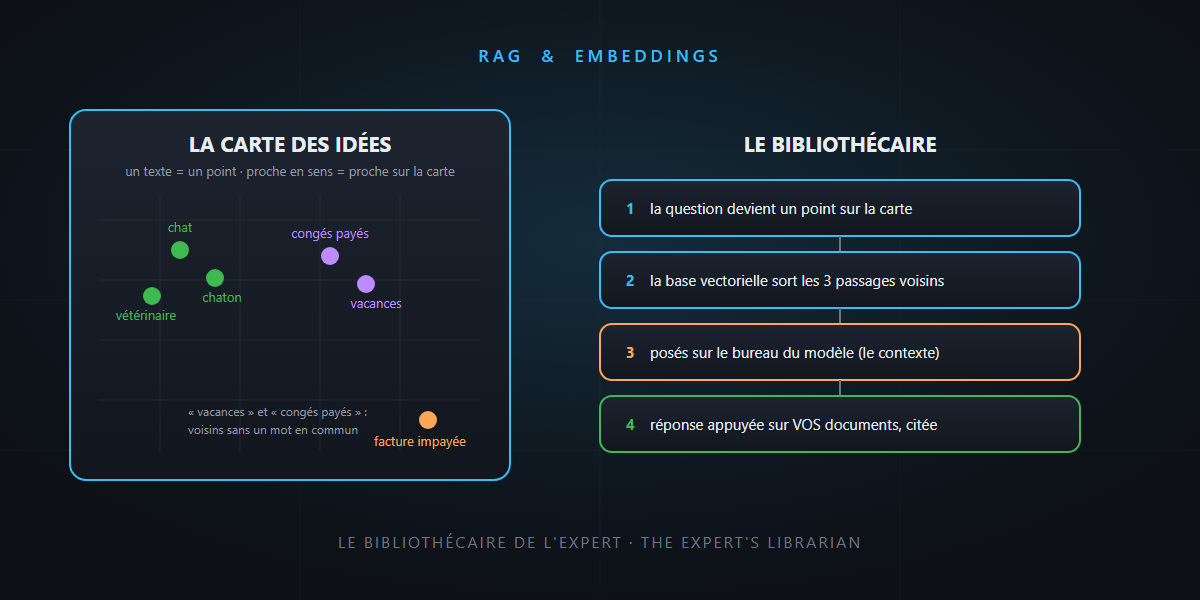
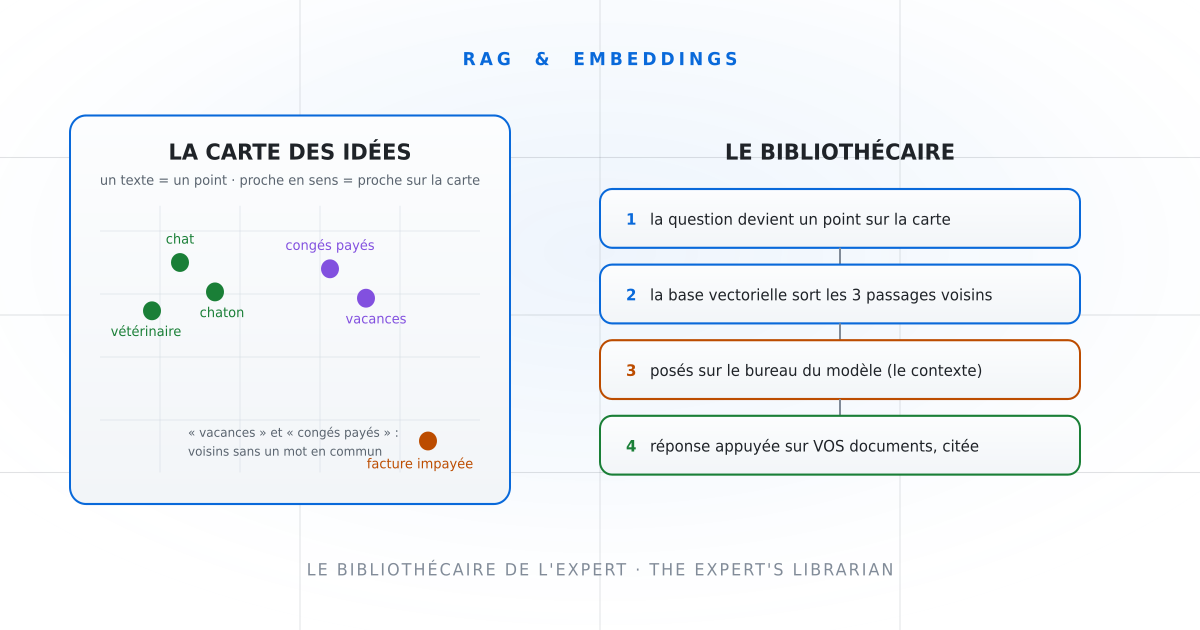
An embedding is a transformation: you give a text to a specialized model, and it returns a list of numbers (a vector, often several hundred numbers long). You can think of those numbers as coordinates on a giant map of ideas.
And here’s the magic property: two texts with similar meaning land at nearby coordinates.
- “kitten” ends up right next to “cat”, not far from “veterinarian”…
- …and very far from “unpaid invoice”.
- Better: “paid leave” and “vacation” are neighbors without sharing a single word.
See the idea? That’s the quality leap over good old Ctrl+F: keyword search finds words, embeddings find meaning. Someone searches for “remote work”? The paragraph about “working from home” comes up anyway.
The vector database: the library sorted by meaning
Once your documents are turned into points, you need to store them and be able to ask: “give me the points closest to this one”. That’s the job of a vector database: a library sorted not alphabetically, but by proximity of ideas, where the shelves group together what talks about the same thing.
A detail that matters: you don’t index whole documents, but chunks of a few paragraphs. Too big, and the chunk drowns the information in noise; too small, and it loses its context. This slicing, known as chunking, is a discreet but decisive tuning knob of any RAG system. A bit like a quantity survey on a building site: the accuracy of the result depends on how you sliced up the work in the first place.
RAG assembled: the librarian and the expert
Everything is in place. Here’s the full film, for every question:
- The question comes in: “what’s the reimbursement deadline for business travel expenses?”
- It’s turned into a point on the same map (embedding of the question).
- Retrieval: the vector database returns the 3 to 5 closest chunks: the “professional expenses” section of your policy, an HR FAQ…
- Augmentation: those chunks are pasted into the context, with the question and an instruction: “answer from these excerpts, cite your sources”.
- Generation: the model writes, grounded in your documents.
The image to remember: the model is a brilliant expert who never read your files; RAG gives it a librarian who, before every answer, lays the three right documents on its desk. The expert doesn’t become more knowledgeable; it becomes documented.
(For the curious folks building agents: this librarian role has a name, context providers. We go into it on our dev blog Sense of [Blog].)
The word of honesty: what RAG doesn’t fix
- The answer is only as good as what the search found. If the right passages don’t come up (bad chunking, ambiguous question, missing document), the model answers off-target, with the same confidence. A RAG system gets evaluated and tuned: it’s plumbing, not magic.
- Hallucination doesn’t disappear. It recedes a lot (the model has the facts in front of it), but it can still embroider between the excerpts. Demand citations: an answer that points to its sources can be checked in one click. (Why does the model embroider, deep down? We devoted a whole article to that question.)
- Freshness is a process. New document = re-indexing. It’s a pipeline to maintain, not a one-off.
In summary
| Notion | The image | What to remember |
|---|---|---|
| Embedding | coordinates on the map of ideas | close in meaning = close on the map, even with no shared words |
| Vector database | the library sorted by meaning | finds the chunks closest to a question |
| Chunking | slicing books into passages | too big = noise, too small = out of context |
| RAG | the expert’s librarian | the 3 right excerpts on the desk, for every question |
- Neither everything-in-the-prompt (expensive, capped) nor fine-tuning (frozen): the right information, at the right time, in small quantity.
- The quality of a RAG system lives in the search (embeddings, chunking) more than in the model.
- Demand citations: RAG documents the expert; it doesn’t make it infallible.
Next time someone tells you “we plugged the AI into our documents”, you’ll know exactly what’s running behind: a map, a librarian, three excerpts on a desk. If I could get my head around it, so can you. See? It’s not rocket science.
