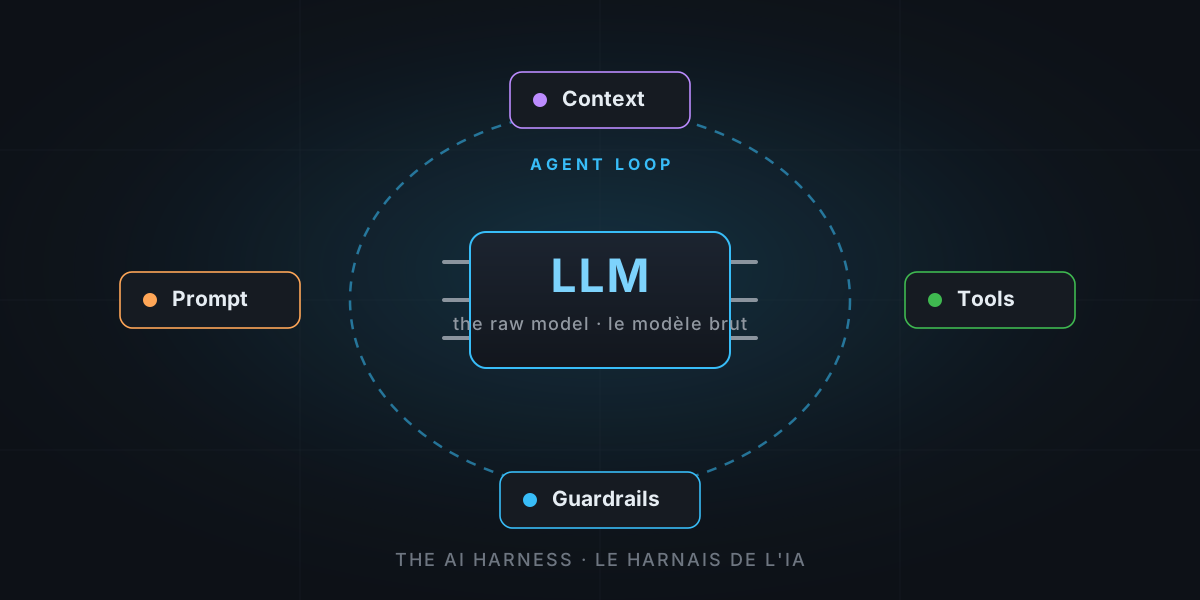
Everyone talks about “the model”: GPT, Claude, Gemini… as if all the magic lived in the brain. Yet a model on its own can’t do anything: it can’t see your code, it can’t run a command, it forgets everything from one sentence to the next. What turns that brain into a real agent is a part we talk about far less: the harness.
So let’s pop the hood and look closely at the machinery. And you’ll see: it’s not rocket science.
The through-line: an over-powered draft horse
Picture an exceptional draft horse. Phenomenal raw strength. But turned loose alone in a field, that power ploughs no furrow and pulls no cart. It just goes in circles.
To turn it into useful work, you need a harness: the blinkers that channel its focus, the reins that give it direction, and the hitch that finally connects the horse to the plough.
An AI model is exactly that horse. The harness is all the software we wrap around it to turn its raw power into concrete action: read a file, edit code, run a test, call a tool. The word isn’t mine — it’s the term the whole field uses. GitHub Copilot, Claude Code, Cursor… these are harnesses. The model is swappable; the harness is what separates a pretty chatbot from a colleague who actually gets work done.
First, a model on its own: what can it do?
Honest answer: text, and nothing else.
A large language model (LLM) is a function. You give it text in, it gives you text out. It’s astonishing… but that’s all. As it stands, it suffers from three handicaps:
- It’s blind and handless. It can’t open a file or run a command. It can only describe what it would do.
- It’s amnesiac. Every call starts from scratch. It has no memory of the previous sentence unless you feed it back in every time.
- It takes only one step. One question, one answer. It can’t chain “I look → I fix → I check”.
The harness exists to compensate for those three handicaps. Let’s take its parts one by one.
The anatomy of a harness, part by part
1. The agent loop: the beating heart
The analogy: it’s the foreman running the job site. He hands the horse an instruction, watches the result, decides what’s next, and starts again until the work is done.
This is the central piece. A classic chatbot does one round trip: question → answer, done. An agent loops:
- The harness sends the model all the context it knows.
- The model replies… but instead of a plain sentence, it can ask: “run this tool”.
- The harness executes the tool and feeds the result back into the conversation.
- Repeat, until the model declares: “done, I’ve finished”.
That “think → act → observe → repeat” loop is what turns a single reply into an autonomous sequence of actions. Without it, there is no agent.
2. The tools: the hands and the eyes
The analogy: we finally give the brain hands to act and eyes to see.
A tool is a function the harness exposes to the model, with a precise description: its name, what it does, the expected parameters. For example:
read_file(path): read a file,edit(path, change): modify code,run_terminal(command): run a command,search(query): search the project.
The model doesn’t perform the action itself: it asks the harness to do it, as a small structured message (“call run_terminal with dotnet test”). The harness runs it for real and reports back the result. That’s the difference between a model that says it would run the tests… and an agent that actually runs them.
3. The system prompt: the house rules on the wall
The analogy: the house rules the horse “reads” before every task. Who it is, how it works, what it’s allowed to do.
The system prompt is a block of text the harness places at the head of every conversation, before your request even starts. It defines the agent’s personality, its rules, the catalogue of available tools, the expected format. It’s invisible to you, but it’s what makes one and the same model behave like a “careful coding assistant” rather than a chatty poet.
4. Context management: a desk that’s too small
The analogy: the model works on a tiny desk. You can’t spread the whole project on it at once. The harness is the librarian who decides which sheets to put on the desk at any given moment.
The model has a limited context window: a maximum amount of text it can “see” at once. A real project never fits entirely. So the harness has to:
- select what’s relevant (the right files, the right excerpts);
- summarize or compact the history when the conversation grows too long;
- discard what’s no longer useful.
It’s a delicate art: too little context and the model works blind; too much and it drowns — and costs a fortune. A harness’s quality is largely decided here.
5. The guardrails: the handbrake
The analogy: you don’t let the horse bolt toward the cliff. There are reins, a brake, and sometimes a fenced paddock.
An agent that can run commands and edit files is powerful… and potentially dangerous. The harness adds guardrails:
- confirmation: ask for your go-ahead before a sensitive action (delete, execute, push);
- allow-lists:
dotnet testgoes through on its own,rm -rfneeds approval; - sandboxing: restrict access to files and the network.
Without guardrails, an agent is a chainsaw with no guard. With them, it becomes a safe power tool.
And the model, in all this?
The model stays the horse: the source of power. But in a good harness it’s swappable. The same harness can hitch a GPT, a Claude or a Gemini, depending on the task, the budget or your preferences. The strength changes; the hitch stays.
Deep-dive: the harness at work inside GitHub Copilot
Enough theory. Let’s open a real harness and look at its gears. GitHub Copilot is a great case study, because it exposes every part we just described, and offers them in several “body shapes”.
The swappable brain: the model picker
Copilot isn’t married to a single model. A picker lets you choose your mount: OpenAI’s models (the GPT family and reasoning models), Anthropic’s (Claude Sonnet, Claude Opus), Google’s (Gemini)… The harness itself doesn’t change: it’s always the same loop, the same tools. You’re only swapping the horse under the harness: a fast model for small chores, a reasoning model for the heavy lifting. As for which horse to hitch, that’s exactly the topic of my article on choosing the model.
Agent mode: the loop in action
Copilot’s agent mode (in VS Code, Visual Studio or JetBrains) is the agent loop in its purest form. You give a high-level goal; the agent plans, edits multiple files, runs terminal commands, reads the errors, corrects itself, and starts over until it reaches the goal. It doesn’t stop at the first answer: it iterates.
Here’s what a single goal looks like from the inside as it unspools the loop:
You: "Add a /health endpoint and its test."

┌─ Turn 1
│  🧠 Model : first I need to understand the structure.
│  🔧 Tool  : search("Program.cs")            → 1 result
├─ Turn 2
│  🧠 Model : I add the health route.
│  🔧 Tool  : edit(Program.cs, +8 lines)
├─ Turn 3
│  🧠 Model : I write the matching test.
│  🔧 Tool  : edit(HealthTests.cs, new file)
├─ Turn 4
│  🧠 Model : I check that everything passes.
│  🔧 Tool  : runInTerminal("dotnet test")     → ❌ 1 failed
├─ Turn 5
│  🧠 Model : a `using` is missing, I fix it.
│  🔧 Tool  : edit(HealthTests.cs, +1 line)
│  🔧 Tool  : runInTerminal("dotnet test")     → ✅ 12 passed
└─ ✅ Done.
Look at turn 4 → turn 5: the agent runs the tests, sees a failure, understands the cause and fixes it on its own. That ability to observe a result and bounce back is the whole value of the loop. A plain assistant would have stopped at turn 3 with “here’s the code, test it yourself”.
The built-in tools: Copilot’s hands
In agent mode, Copilot ships with a ready-made toolkit. Without being exhaustive:
- explore and search the code (the workspace index);
- read and edit files, in several places at once;
- run commands in the terminal;
- run the tests and read the errors (the problems);
- fetch a web page for external docs.
And above all, this toolkit is extensible via MCP (Model Context Protocol): you plug in your own in-house tools (database, Jira, monitoring, browser…) and they join the catalogue the model can call. The harness is no longer limited to your code: it reaches your whole ecosystem.
How Copilot fills the desk: context
Remember the too-small desk. Copilot furnishes it in several ways:
- automatically: the open files, the current selection, a repository index that lets it retrieve the right excerpt without loading everything;
- on demand, when you point at things with
#-references (#file,#selection,#codebase…) or@-participants (@workspace,@terminal); - permanently, via your instructions files (
.github/copilot-instructions.md), which restate your conventions on every turn.
That’s exactly the librarian’s job: deciding what deserves a spot on the desk. And this is where your customizations come in, a topic I covered in detail in Skills, Instructions, Agents, MCP… it’s not rocket science!. Those files are, at heart, just better ways to pack the harness.
The guardrails: Copilot doesn’t bolt off
Copilot applies every brake we’ve seen. Before running a terminal command, it asks for confirmation. You can define allow-lists (trusted commands go through without interruption, the rest don’t) and sandbox local MCP servers to restrict their access. The principle: the agent proposes, but you keep control of anything that really touches your machine.
One harness, three body shapes
The most elegant part: it’s the same machinery offered in three forms, depending on where you work.
| Body shape | Where it runs | What it’s for |
|---|---|---|
| In the IDE | VS Code, Visual Studio, JetBrains | Completion, chat and agent mode, right next to your code |
| On the command line | Copilot CLI, in the terminal | Drive the agent from the keyboard, without leaving the shell |
| In the cloud | Coding agent, on GitHub Actions | You assign it an issue: it works alone and opens a Pull Request |
The coding agent is the most spectacular: you hand it a GitHub ticket, it spins up an ephemeral environment, runs the exact same “think → act → observe” loop, and delivers a PR for you to review. Same harness, same loop, same tools — simply unplugged from your screen and plugged into a server.
The recap: the parts of the harness
| Part | The image | Its role |
|---|---|---|
| The loop | The foreman | Chain think → act → observe until the goal |
| The tools | The hands and eyes | Read, edit, execute, search: act for real |
| The system prompt | The rules on the wall | Define who the agent is and its rules |
| The context | The librarian | Choose what to put on a too-small desk |
| The guardrails | The handbrake | Confirm, allow-list, sandbox |
| The model | The draft horse | The raw power, swappable |
The moral of the story
Next time someone sells you “the new model that changes everything”, remember the draft horse. Raw power matters, of course. But what turns that power into real work — reading, fixing, testing, shipping — is the harness.
And understanding the harness changes how you see things: when you add instructions, a skill, an agent or an MCP server, you’re not “configuring a chatbot”. You’re adjusting the hitch so the horse pulls straight.
See the machinery now? The brain, the loop, the tools, the context, the brakes…
And that, when you get down to it… is not rocket science.